
Explore the controls
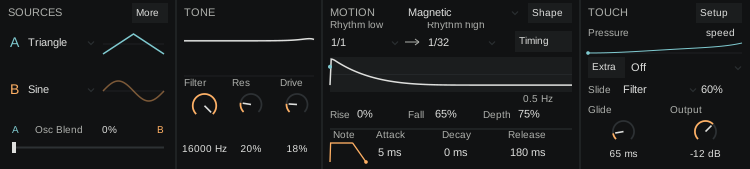 Wave A and Wave BWave A and Wave BOsc BlendFilterResonanceDriveClockRhythm Low and Rhythm HighRhythm Low and Rhythm HighRiseFallDepthAttackDecayReleasePressure extra / Press TargetSlide TargetSlide AmountGlideOutputMoreShapeTimingSetupExtra
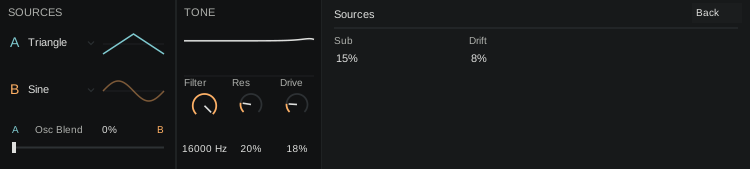
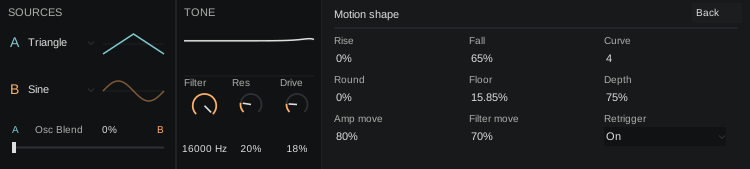 Wave A and Wave BWave A and Wave BOsc BlendFilterResonanceDriveRiseFallCurveRoundFloorDepthAmp MotionFilter MotionRetriggerBack
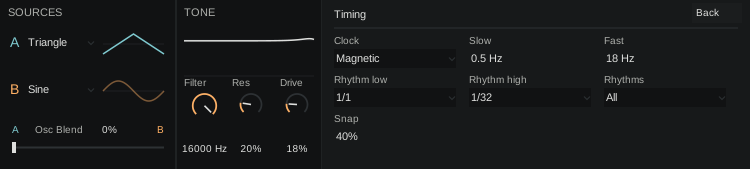 Wave A and Wave BWave A and Wave BOsc BlendFilterResonanceDriveClockSlow and FastSlow and FastRhythm Low and Rhythm HighRhythm Low and Rhythm HighRhythmsSnapBack
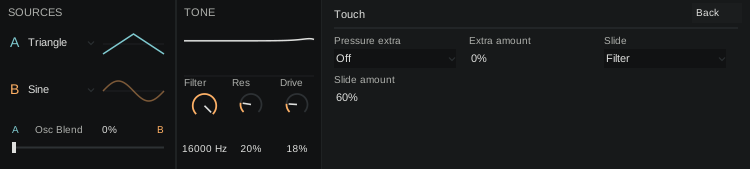 Wave A and Wave BWave A and Wave BOsc BlendFilterResonanceDrivePressure extra / Press TargetPress AmountSlide TargetSlide AmountBack
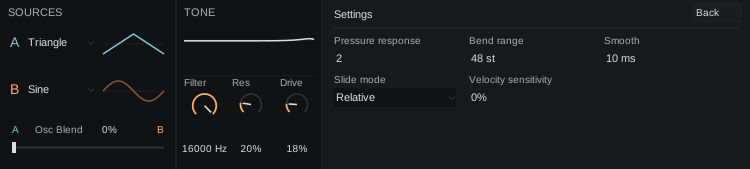 Wave A and Wave BWave A and Wave BOsc BlendFilterResonanceDrivePressure response / Press CurveBend RangeSmoothSlide ModeVelocity sensitivityBack
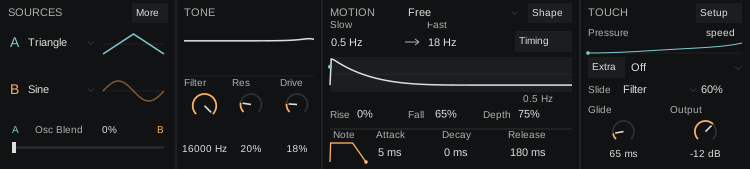 Wave A and Wave BWave A and Wave BOsc BlendFilterResonanceDriveClockSlow and FastSlow and FastRiseFallDepthAttackDecayReleasePressure extra / Press TargetSlide TargetSlide AmountGlideOutputMoreShapeTimingSetupExtra
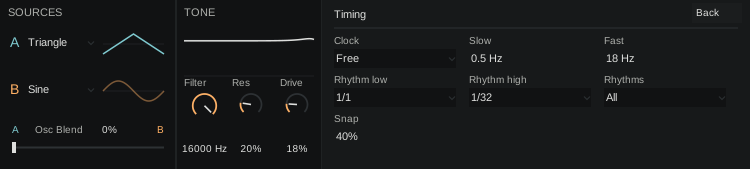 Wave A and Wave BWave A and Wave BOsc BlendFilterResonanceDriveClockSlow and FastSlow and FastRhythm Low and Rhythm HighRhythm Low and Rhythm HighRhythmsSnapBack
Every control has a reference below, including settings found in other panels.
How the sound travelsSignal flow and control paths
How lean turns gestures into sound
Two oscillators and a sub feed the filter and drive; a repeating motion shapes the voice.
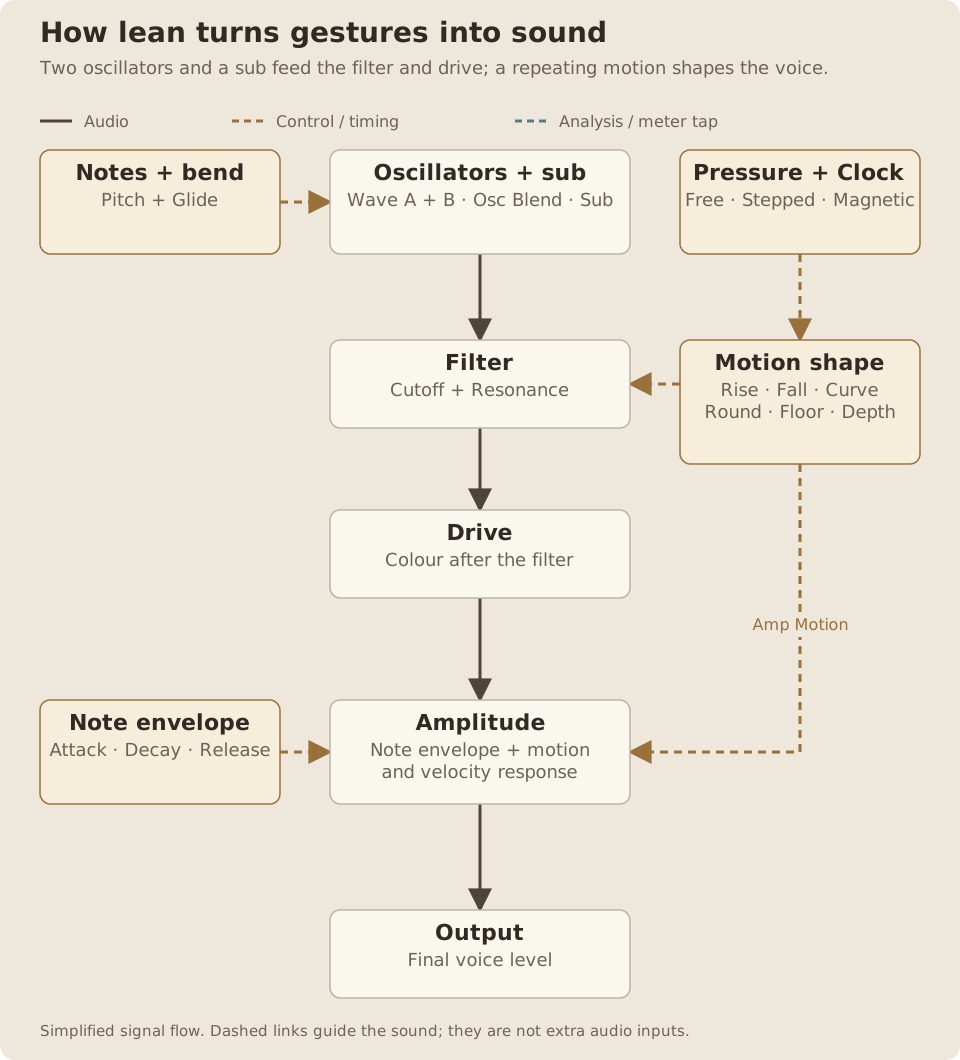
Read the path
- Notes, bend and Glide set the pitch of Oscillator A, Oscillator B and the sub.
- Osc Blend combines A and B before the shared Filter and Resonance, then Drive.
- Pressure and Clock set repetition speed. The motion shape can move amplitude and filter.
- The note envelope, velocity response and motion scale the sound before Output.
- Pressure controls repetition speed, even when Press Target is Off. Zero pressure selects Slow or Rhythm Low.
- Depth sets the strength of repeating motion. Amp Motion and Filter Motion choose how much reaches each destination.
- The note Attack, Decay and Release are separate from the repeating Rise, Fall, Curve and Round.
- Pressure and slide can also be assigned to Filter, Drive, Depth or Rise. These are control paths, not extra audio inputs.
lean is a monophonic lead and bass instrument. Two oscillators feed a shared filter and drive. A repeating envelope moves the amplitude and filter, and pressure changes its speed. Bend notes sideways, slide to a chosen destination, and use Glide to join overlapping notes.
lean goes on a MIDI track, rather than after another instrument. For installation and requirements, see Getting started.
Quick start
Something unclear?- Load lean on a MIDI track and play a note.
- Hold the note and press gradually harder. The repeating motion changes speed.
- Play a second note while holding the first and adjust Glide.
- Try Wave A and Wave B, then move Osc Blend between them.
- Open Filter for brightness and adjust Drive for color.
- Set Depth to 0% to hear a steady sound without cyclic chopping, then bring it back up.
The initial sound uses Triangle Wave A, Sine Wave B, Osc Blend 0%, Output −12 dB, Drive 18% and Glide 65 ms. The starting Clock is Magnetic, with pressure moving between 1/1 and 1/32, All rhythms and Snap 40%. Velocity sensitivity starts at 0%, so gentle and firm note strikes have the same starting level. Pressure still works independently.
Finding the controls
Something unclear?- Starting point
- Choose the matching view above the interface illustration to inspect those controls.
The desktop Instrument view is grouped into Sources, Tone, Motion and Touch. Additional controls open in local detail views:
- More in Sources: Sub and Drift.
- Shape in Motion: the repeating envelope and its destinations.
- Timing: Clock, free rates, rhythmic bounds and Snap.
- Extra in Touch: additional pressure and slide assignments.
- Setup: velocity response, pressure response, smoothing, slide mode and bend range.
Close a detail view to return to the Instrument view. On Push, these settings are organized into the six banks described below.
Sources and tone
Something unclear?Wave A and Wave B
Something unclear?- Range
- Sine, Triangle, Saw, Pulse; Sine, Triangle, Saw, Pulse
- Default / reset
- Default: Wave A: Triangle; Wave B: Sine
- Starting point
- Try Triangle A, Sine B and Osc Blend at 50%.
- Available when
- Wave B becomes audible only when Osc Blend is above 0%.
Each oscillator offers Sine, Triangle, Saw and Pulse. Sine is the simplest starting point; Saw and Pulse provide more upper harmonics for the filter and drive to work with.
Both oscillators follow the same played pitch, bend, glide and drift. They do not have separate tuning controls.
Osc Blend
Something unclear?- Range
- 0–100%
- Default / reset
- Default: 0%
- Starting point
- Start at 50% to hear both wave choices.
Blends between the oscillators: 0% is A only, 100% is B only, and 50% gives equal amounts. You can change the blend while holding a note.
Wave A starts as Triangle, Wave B as Sine, and the starting blend is A only. Changing Wave B will therefore be inaudible until you bring it into the blend.
- Range
- 0–100%
- Default / reset
- Default: 15%
- Starting point
- Try 15% to reinforce a bass without overwhelming its main tone.
Sets the amount of the sine sub oscillator, from 0% to 100%. Use it to reinforce the lower part of a lead or bass sound. Find it under Sources’ More view or Push’s Sound bank.
Drift
Something unclear?- Range
- 0–100%
- Default / reset
- Default: 8%
- Starting point
- Start at 8%; reduce toward 0% for a steadier pitch.
Adds pitch drift, from 0% to 100%, to give the oscillators movement. Reduce it for a more stable pitch. The two sources share the same drift behavior.
Filter
Something unclear?- Range
- 40–16000 Hz
- Default / reset
- Default: 16000 Hz
- Starting point
- Try 4 kHz for a darker starting tone, with Filter Motion at 0% while comparing.
- Available when
- Motion and touch assignments can close or open the cutoff away from its base.
Sets the base cutoff of the shared resonant low-pass filter, from 40 Hz to 16 kHz. The starting base cutoff is fully open at 16 kHz.
Filter Motion and touch assignments can move the cutoff away from this base. If the sound still closes with Filter fully open, check Depth and Filter Motion.
Resonance
Something unclear?- Range
- 0–100%
- Default / reset
- Default: 20%
- Starting point
- Try 20% while moving Filter.
Emphasizes the region around the filter cutoff, from 0% to 100%. Higher values make filter movement more pronounced.
Drive
Something unclear?- Range
- 0–100%
- Default / reset
- Default: 18%
- Starting point
- Start at 18% and compare small changes while holding a note.
Sets soft-drive coloration after the shared filter, from 0% to 100%. It can also be a pressure or slide destination. Use Output to set the final listening level after changing the sound.
Glide
Something unclear?- Range
- 0–500 ms
- Default / reset
- Default: 65 ms
- Starting point
- Try 65 ms and overlap two notes.
- Available when
- Glide is heard between overlapping legato notes.
Sets pitch transition time between overlapping notes, from 0 to 500 ms. A fresh phrase starts at its played pitch; glide joins legato changes rather than sliding in from an unrelated starting note.
Output
Something unclear?- Range
- -36–0 dB
- Default / reset
- Default: -12 dB
- Starting point
- Begin at −12 dB and leave headroom for resonant or driven patches.
Sets final output level from −36 to 0 dB. It starts at −12 dB. Leave room for following effects, especially when raising Drive or adding the sub oscillator.
Note envelope
Something unclear?The note envelope controls the whole phrase. It is separate from the repeating Motion envelope.
Attack
Something unclear?- Range
- 1–1000 ms
- Default / reset
- Default: 5 ms
- Starting point
- Try 5 ms for a clear lead or 100 ms for a softer swell.
Sets the initial fade-in, from 1 to 1,000 ms. Short times give a direct entrance; longer times make the note swell in.
Decay
Something unclear?- Range
- 0–10000 ms
- Default / reset
- Default: 0 ms
- Starting point
- Leave 0 ms for sustain; try 800 ms for a held phrase that fades.
At 0 ms, a held note sustains. Above zero, Decay fades the held phrase after Attack, up to 10,000 ms. Expression remains active during the fade.
Overlapping notes and legato slides keep the same fade. Release all notes and sustain before playing again when you want a fresh decaying hit. Turning Decay back to 0 returns smoothly to the held level.
Release
Something unclear?- Range
- 5–3000 ms
- Default / reset
- Default: 180 ms
- Starting point
- Try 180 ms for a short trail, or 50 ms for tight bass.
Sets the fade after notes and sustain are released, from 5 to 3,000 ms. Short Release is useful for tight bass; longer Release lets a phrase trail away.
Motion shape
Something unclear?Motion repeats while you hold a phrase. Pressure sets its speed; these controls set the shape of each cycle.
Depth
Something unclear?- Range
- 0–100%
- Default / reset
- Default: 75%
- Starting point
- Start at 75%; use 0% to compare with a steady note.
Sets the overall amount of repeating movement, from 0% to 100%. It scales the amplitude and filter motion independently according to their own amounts.
At 0%, cyclic amplitude chopping and cyclic filter movement are removed. Note Attack, Decay and Release still apply.
- Range
- 0–95%
- Default / reset
- Default: 0%
- Starting point
- Try 20% for a more gradual opening.
Sets the opening portion of each cycle, from 0% to 95%. Lower values reach the top sooner; higher values spend more of the cycle rising. Rise can also receive an extra pressure or slide assignment.
- Range
- 1–100%
- Default / reset
- Default: 65%
- Starting point
- Try 65%, then shorten it for a sharper closing pulse.
Sets how much of the time remaining after Rise is used for the fall, from 1% to 100%. A short Fall gives a sharper closing gesture. A longer Fall spreads the return toward the floor across more of the cycle.
Curve
Something unclear?- Range
- 0.5–8
- Default / reset
- Default: 4
- Starting point
- Start at 4; try 1 for a straighter contour.
Changes the falling contour, from 0.5 to 8. Higher values make the envelope drop more strongly during its fall. Use it with Fall to find the balance between a pluck, a pulse and a longer swell.
Round
Something unclear?- Range
- 0–100%
- Default / reset
- Default: 0%
- Starting point
- Try 100% with Rise 50%, Fall 100% and Curve 1 for rounded motion.
Blends the transition shape toward a rounded cosine movement, from 0% to 100%. For sinusoidal motion, try Rise 50%, Fall 100%, Curve 1, Round 100% and Floor 0%.
Floor
Something unclear?- Range
- 0–100%
- Default / reset
- Default: 15.85%
- Starting point
- Start near 16%; lower toward 0% for deeper dips.
Sets the minimum of the repeating envelope, from 0% to 100%. A lower floor allows deeper dips. Raising it keeps more sound and filter openness between peaks. At 100%, the envelope no longer dips.
Amp Motion
Something unclear?- Range
- 0–100%
- Default / reset
- Default: 80%
- Starting point
- Try 80% for clear rhythmic level movement.
- Available when
- Scaled by Depth; at 0% amplitude remains steady.
Sets how much the repeating envelope changes amplitude, from 0% to 100%. At 0%, amplitude stays steady even if the filter is moving. It is also scaled by Depth.
Filter Motion
Something unclear?- Range
- 0–100%
- Default / reset
- Default: 70%
- Starting point
- Try 70% with Filter open enough to hear movement.
- Available when
- Scaled by Depth; affects brightness even with Amp Motion at 0%.
Sets how much the repeating envelope closes the filter below its base cutoff, from 0% to 100%. It is also scaled by Depth. On some views the label is shortened to Filter Move.
Retrigger
Something unclear?- Range
- Off, On
- Default / reset
- Default: On
- Starting point
- Use On for repeatable starts when you release all notes between phrases.
- Available when
- Legato notes do not restart motion.
Chooses whether a fresh phrase resets repeating motion. On restarts it; Off allows its phase to continue. Legato notes do not reset it in either case.
Timing
Something unclear?Clock
Something unclear?- Range
- Free, Stepped, Magnetic
- Default / reset
- Default: Magnetic
- Starting point
- Try Magnetic for continuous pressure movement with rhythmic attraction.
Chooses Free, Stepped or Magnetic:
- Free: pressure moves continuously between Slow and Fast in hertz.
- Stepped: pressure selects the nearest allowed tempo-relative division.
- Magnetic: pressure moves continuously, with attraction toward the allowed divisions according to Snap.
Rhythmic modes follow the song tempo, but the motion is not locked to the song’s beat position. Retrigger determines the start of a fresh phrase. Motion can continue while the transport is stopped.
Slow and Fast
Something unclear?- Range
- 0.1–90 Hz; 0.1–90 Hz
- Default / reset
- Default: Slow: 0.5 Hz; Fast: 18 Hz
- Starting point
- Start at 0.5 Hz and 18 Hz, then narrow the endpoints to comfortable speeds.
- Available when
- Used in Free mode; rhythmic modes show Rhythm Low and High instead. Zero pressure uses Slow, including ordinary MIDI without pressure.
Set Free mode’s pressure endpoints, each adjustable from 0.1 to 90 Hz. Slow is the low-pressure endpoint and Fast the high-pressure endpoint. They start at 0.5 and 18 Hz.
You can reverse the endpoints if you want firmer pressure to slow the motion. These controls retain their Free settings when you switch Clock modes.
Rhythm Low and Rhythm High
Something unclear?- Range
- 1/1D, 1/1, 1/2D, 1/1T, 1/2, 1/4D, 1/2T, 1/4, 3/16, 1/4T, 1/8, 3/32, 1/8T, 1/16, 3/64, 1/16T, 1/32, 1/64D, 1/32T, 1/64, 1/64T; 1/1D, 1/1, 1/2D, 1/1T, 1/2, 1/4D, 1/2T, 1/4, 3/16, 1/4T, 1/8, 3/32, 1/8T, 1/16, 3/64, 1/16T, 1/32, 1/64D, 1/32T, 1/64, 1/64T
- Default / reset
- Default: Rhythm Low: 1/1; Rhythm High: 1/32
- Starting point
- Try 1/4 and 1/16 for a compact rhythmic range.
- Available when
- Used in Stepped or Magnetic mode. Zero pressure uses Rhythm Low, including ordinary MIDI without pressure.
Set the low-pressure and high-pressure endpoints in Stepped and Magnetic modes. They replace Slow and Fast on the Play page when a rhythmic Clock is selected.
The division menu spans dotted whole note 1/1D through 1/64T, with straight, dotted and triplet choices. D means dotted and T means triplet. The starting endpoints are 1/1 and 1/32. They can be reversed to make firmer pressure move toward longer divisions.
Rhythms
Something unclear?- Range
- Straight, Triplets, Dotted, All
- Default / reset
- Default: All
- Starting point
- Try Straight for a more regular set of pressure-selected divisions.
- Available when
- Used in rhythmic clock modes; selected endpoints remain reachable.
Chooses which divisions pressure can move through: Straight, Triplets, Dotted or All. The explicitly selected low and high endpoints remain reachable even when they are from another family.
- Range
- 0–100%
- Default / reset
- Default: 40%
- Starting point
- Start at 40%; raise it for steadier regions around rhythmic divisions.
- Available when
- Used in Magnetic mode.
Sets the attraction toward rhythmic divisions in Magnetic mode, from 0% to 100%. At 0%, the movement is continuous. Higher values create broader, steadier regions near the allowed divisions, with transitions between them.
For discrete steps, use Stepped Clock instead. Snap is not a song-position quantizer.
Playing with touch
Something unclear?Pressure response / Press Curve
Something unclear?- Range
- 0.25–4
- Default / reset
- Default: 2
- Starting point
- Start at 2; try 1 if you want a more even pressure response.
Shapes the response of pressure to repetition speed, from 0.25 to 4. The starting value is 2, giving more finger travel through the middle of the rate range. A value of 1 gives the neutral pressure curve.
Use this with the rate endpoints to make the useful speeds comfortable to reach. This control does not change note-on velocity sensitivity.
Pressure extra / Press Target
Something unclear?- Range
- Off, Filter, Drive, Depth, Rise
- Default / reset
- Default: Off
- Starting point
- Choose Filter for an extra brightness movement after learning pressure speed.
- Available when
- Follows incoming pressure, which also controls repetition speed. Zero pressure leaves the extra destination at its manual base setting.
Adds an optional pressure destination: Off, Filter, Drive, Depth or Rise. Pressure still controls repetition speed when this extra target is Off or assigned elsewhere. The extra destination follows the same incoming pressure. At zero pressure, it adds no change to the destination’s manual base setting.
Press Amount
Something unclear?- Range
- -100–100%
- Default / reset
- Default: 0%
- Starting point
- Try +25% with Press Target set to Filter.
- Available when
- Requires a Press Target other than Off and incoming pressure.
Sets the signed amount of that extra assignment, from −100% to +100%. Positive and negative amounts move the destination in opposite directions from its manual base setting. The result stays within the destination’s range.
Slide Target
Something unclear?- Range
- Off, Filter, Drive, Depth, Rise
- Default / reset
- Default: Filter
- Starting point
- Start on Filter and move your controller’s CC74 gesture.
Chooses what vertical MPE slide controls: Off, Filter, Drive, Depth or Rise. It starts on Filter. Slide is carried by MIDI CC74; the physical gesture depends on your controller.
Slide Amount
Something unclear?- Range
- -100–100%
- Default / reset
- Default: 60%
- Starting point
- Start at +60%; reverse its sign to reverse the gesture.
- Available when
- Requires a Slide Target other than Off and incoming CC74.
Sets the signed influence of slide, from −100% to +100%. Use a positive amount to add to the destination’s base or a negative amount to move the other way. The base control still sets the starting sound.
Slide Mode
Something unclear?- Range
- Relative, Absolute
- Default / reset
- Default: Relative
- Starting point
- Use Relative when each new finger position should begin neutral.
Relative starts each touch neutral and responds to movement from that starting position. Absolute uses the full incoming CC74 position. Relative is the starting mode.
Smooth
Something unclear?- Range
- 1–100 ms
- Default / reset
- Default: 10 ms
- Starting point
- Start at 10 ms; raise it if gesture changes feel too abrupt.
- Available when
- Applies to changes in pressure, slide and bend. Glide separately controls legato pitch movement.
Smooths changes in performance gestures, from 1 to 100 ms. Lower values respond more directly; higher values soften abrupt gesture changes. This is separate from Glide, which sets legato pitch movement.
Bend Range
Something unclear?- Range
- 1–96 semitones
- Default / reset
- Default: 48 semitones
- Starting point
- Match 48 semitones on lean and the MPE controller.
- Available when
- Requires incoming member-channel pitch bend.
Sets the MPE member-channel bend range, from 1 to 96 semitones, starting at 48. Match the controller’s bend range to avoid a small sideways motion producing an unexpectedly large or small pitch change. Manager-channel bend has its own sensitivity.
Velocity sensitivity
Something unclear?- Range
- 0–100%
- Default / reset
- Default: 0%
- Starting point
- Try 50% for a blend of fixed and played note levels.
Blends fixed and played note-on velocity. At 0%, note level uses fixed MIDI velocity 100. At 100%, played velocity controls level. Intermediate settings blend the two.
The starting 0% makes gentle strikes speak at the normal starting level. Pressure remains independent and still changes repetition speed after the note begins.
Monophonic notes and sustain
Something unclear?lean plays one note at a time. The newest held note takes priority. Releasing it returns to the most recently held note that is still physically down. Sustain retains released notes when no fingers remain.
Overlapping notes keep the existing motion phase and held-note Decay. Release all fingers and sustain to start a fresh phrase. A new phrase takes its own initial bend, pressure, slide and velocity.
You can also play touch from ordinary MIDI without pressure or slide. At zero pressure, repetition uses Slow in Free mode or Rhythm Low in Stepped and Magnetic modes. Incoming channel pressure or poly pressure for the played note moves toward the other endpoint through Smooth. This also applies to MPE member channels. The extra pressure destination follows that same pressure gesture, and motion remains available from its manual controls.
How-tos
Something unclear?Play an expressive repeating lead
Something unclear?Choose Magnetic Clock, set Rhythm Low to 1/4 and Rhythm High to 1/32, then hold a note and vary pressure. Adjust Press Curve for the comfortable part of your pressure range. Add Filter as a slide destination and use Glide for overlapping notes.
Make a sustained bass
Something unclear?Set Decay to 0 ms, reduce Depth, and choose Sine or Triangle. Add Sub, adjust Filter and keep Release short enough for the part. Use Glide to connect overlapping notes.
Make a bass that fades while you bend it
Something unclear?Raise Decay above 0 ms, choose a direct Attack and use a moderate Glide. Keep overlapping notes down while bending. The phrase continues its fade across legato notes; release all notes and sustain to retrigger a fresh hit.
Move the filter without chopping the volume
Something unclear?Set Amp Motion to 0%, raise Filter Motion, and keep Depth above 0%. Adjust Filter as the base cutoff, then use pressure to change the filter cycle’s speed.
Hear the two oscillators clearly
Something unclear?Set Depth to 0%, open Filter and choose noticeably different waves, such as Sine for A and Pulse for B. Sweep Osc Blend while holding a note. Bring motion back after setting the blend.
Push and Live
Something unclear?The six Push banks contain the full set of controls:
- Play: Osc Blend, Slow, Fast, Depth, Decay, Filter, Drive, Glide. Rhythmic Clock replaces Slow and Fast with Rhythm Low and Rhythm High.
- Sound: Wave A, Wave B, Sub, Drift, Resonance, Attack, Release, Output.
- Shape: Rise, Fall, Curve, Round, Floor, Amp Motion, Filter Motion, Retrigger.
- Timing: Clock, Slow, Fast, Rhythm Low, Rhythm High, Rhythms, Snap, Retrigger.
- Touch: Slide Target, Slide Amount, Press Target, Press Amount, then four empty positions.
- Settings: Velocity Sens, Press Curve, Smooth, Slide Mode, Bend Range, then three empty positions.
The Play page has no upper-button shortcuts. Wave choices are on Sound; Clock is on Timing.
Troubleshooting
Something unclear?Gentle notes are as loud as firm ones
Something unclear?Velocity sensitivity starts at 0%. Raise it in Setup or the Settings bank if you want note-on strength to change volume. Pressure still controls repetition speed independently.
Pressure does not seem to change speed
Something unclear?Check that the controller is sending pressure, that the rate endpoints differ, and that the selected range is audible. In Stepped mode you may need to cross into another division before the speed changes. Depth 0% removes the cyclic amplitude and filter movement even though the clock can still run.
Wave B makes no difference
Something unclear?At Osc Blend 0%, only Wave A is heard. Move the blend toward B.
The note fades even though I am holding it
Something unclear?Set Decay to 0 ms to sustain. A positive Decay deliberately fades the held phrase, and overlapping notes keep that same fade.
The repeating motion is not on the song’s beat
Something unclear?Stepped and Magnetic follow tempo rather than song-position phase. Use Retrigger On and play the start of the phrase where you want the cycle to begin.
The filter keeps closing with Filter fully open
Something unclear?Filter is a base cutoff. Reduce Filter Motion or Depth, and check pressure and slide assignments that also target Filter.
Sideways bends are too wide
Something unclear?Check Bend Range against the controller’s MPE bend setting. They need to agree for the expected pitch response.