shape.
Give every hit the right feel.
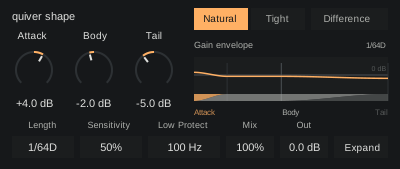
Bring out the attack, give the body more weight or pull back a lingering tail. Shape puts the articulation of drum loops and vocal chops in your hands.
MAX FOR LIVE AUDIO EFFECT / ONE-TIME PURCHASE
Find the front of the sound.
Emphasize the beginning for more definition, or soften it when a hit feels too sharp.
Give the middle its weight.
Reinforce the body behind the attack, or ease it back to change how a loop sits in the track.
Leave the right amount behind.
Lift sustain and room already in a recording, or pull them back for a more contained feel.
Find a different feel in the same recording.
Work with drum loops, percussion and vocal chops. Attack, Body and Tail shape overlapping moments of the sound, so a small adjustment can change its whole feel.
Take a closer lookKeep the shape close to the groove.
Start from neutral, then choose how much of each stage to bring forward. Length follows your song’s tempo while the events in your recording keep their own timing.
- 01Length
- Set the transition from body to tail in musical note lengths, from 1/128 to a whole note.
- 02Sensitivity
- Include quieter changes or concentrate the shaping on stronger events.
- 03Low Protect
- Gradually reduce shaping in lower frequencies. Turn it down to work across the full signal.
- 04Mix + Out
- Blend the shaped sound with your original, then trim the final output to suit the track.
Optimized for Push.
A focused bank keeps everyday changes under the eight encoders. Two assigned buttons keep the occasional choices close.
- 01
Keep the shape together
Attack, Body and Tail lead the bank, with Length and the supporting controls alongside.
- 02
Choose the response
Switch between Natural and Tight for a rounded or more direct envelope and recovery.
- 03
Listen to the change
Use Listen on Push to switch between Normal and Difference while you work.
Make it part of your setup.
Max for Live audio effect. One-time purchase.
The Max for Live bundle.
Pump, distort, shape, clipper and lean. Four focused effects and an expressive synth for finding space, adding character and shaping the feel of your track.
Already own a device? Complete your collection
A few useful details.
What do I need to run shape?
You need Ableton Live Suite, or Live Standard with Max for Live.
Can I use it on Push 3 standalone?
Shape is designed around one bank of eight device controls, with Response and Listen on two assigned buttons. Listen switches between Normal and Difference.
Does Length follow the tempo?
Yes. Length sets the body-to-tail transition using straight, dotted or triplet note divisions. It follows the song tempo while preserving the timing of the incoming events.
How does Low Protect work?
It gradually reduces the shaping applied to lower frequencies. At minimum, shaping covers the full signal. Its effect is gradual around the selected frequency.
How do I install a Max for Live device?
Put the downloaded device in your User Library and drag it onto an audio track in Live. See the installation instructions for Live and Push.
Is shape part of Quiver Complete?
The Max for Live range has its own bundle: pump, distort, shape, clipper and lean. Quiver Complete contains the native plugins. Each range has its own bundle and collection pricing.
Do bundles include future releases?
Your bundle includes the products listed when you buy it. Future releases are sold separately. When a new product joins your bundle, use Complete your collection to get bundle pricing on the products you don’t already own. You won’t need to buy the whole bundle again.