
clipper.
Keep the impact. Shape the peaks.
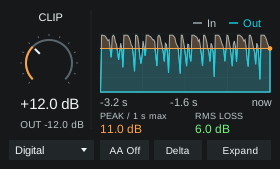
All ten clipping characters in a 280 px device. Watch removed peaks in the waveform and expand for a wider display with I/O meters.
MAX FOR LIVE AUDIO EFFECT / ONE-TIME PURCHASE
A little device. Room to look closer.
Keep the waveform, removed peaks and Peak/RMS loss in view. All ten modes are in the menu. Expand for a wider graph, I/O meters and individual mode buttons. Your sound settings stay exactly where you left them.

Controls you can play by feel.
- 01Clip
- Turn up the clipping amount with equal inverse output gain. Keep gain changes and clipping in one control.
- 02Mode
- Choose Digital for hard clipping, Sine for a softer curve, Asym for uneven coloration or Fold for folding distortion. The mode menu also includes Rounded, Cubic, Tanh, Arctan, Algebraic and Exponential. All ten remain available in both layouts and on Push.
- 03AA
- Choose Off, 4x or 8x. AA Off has no added processing delay; the oversampled modes add 90 samples.
- 04Delta Listen
- Audition aligned input minus processed output. The meters continue to show the normal processed signal.
Optimized for Push.
Clip and Mode lead the bank. Peak loss and RMS loss stay visible, with AA and Delta on the two rightmost buttons.
Make it part of your setup.
Max for Live audio effect. One-time purchase.
The Max for Live bundle.
Pump, distort, shape, clipper and lean. Four focused effects and an expressive synth.
Already own a device? Complete your collection
A few useful details.
What do I need to run clipper?
You need Ableton Live Suite, or Live Standard with Max for Live. Put the device on an audio track in Live.
What changes when I expand the device?
The history and curve display gets wider, with I/O meters and individual buttons for all ten modes. The selected clipping mode, amount, AA and Delta settings stay unchanged. Collapse returns to the compact layout.
Can I use it on Push 3 standalone?
Clipper is designed for Push 3 standalone.
Does Clipper add latency?
AA Off adds zero samples of processing latency. Both 4x and 8x modes add 90 samples. Switching AA modes briefly fades the output while the delay changes.
Is the clip level a guaranteed output ceiling?
No. Oversampling filters can reconstruct peaks above the nominal clip level. Clipper does not guarantee a true-peak ceiling.
Is clipper part of Quiver Complete?
The Max for Live range has its own bundle: pump, distort, shape, clipper and lean. Quiver Complete contains the native plugins. Each range has its own bundle and collection pricing.
Do bundles include future releases?
Your bundle includes the products listed when you buy it. Future releases are sold separately. When a new product joins your bundle, use Complete your collection to get bundle pricing on the products you don’t already own. You won’t need to buy the whole bundle again.
Interface and control-layout illustrations.