distort.
Give your sound a little character.
Take a sound from warm to rough, then bring the curve to life with modulation that moves with your track.
MAX FOR LIVE AUDIO EFFECT / ONE-TIME PURCHASE
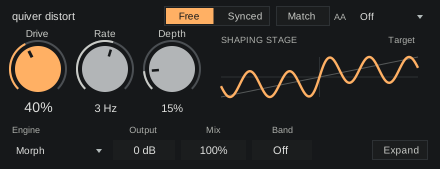
Choose your character.
Explore Tube, Clip, Knee, Soft, Round and Fat, with Drive and Output side by side.
Put it in motion.
Bring in Depth and Rate to move the saturation curve. Let it drift freely or sync it to the beat.
Keep your low end clean.
Use Band to saturate above a chosen frequency, then blend it back with Mix.
Find the colour in your sound.
Start with a little Drive, choose a character and bring in movement. The controls stay close while you explore.
Optimized for Push.
Make small changes without breaking your flow. A focused bank puts the controls you need directly under the eight encoders.
- 01
Drive and output together
Move between character and level without searching through pages.
- 02
Movement within reach
Rate, Sync and Depth sit together. In Synced mode, Rate becomes a musical Division.
- 03
One focused bank
Quality and Match use the two rightmost buttons. Drive, Engine, Mix, timing, Band and Output stay on the encoders.
Make it part of your setup.
Max for Live audio effect. One-time purchase.
The Max for Live bundle.
Pump, distort, shape, clipper and lean. Four focused effects and an expressive synth.
Already own a device? Complete your collection
A few useful details.
What do I need to run these?
You need Ableton Live Suite, or Live Standard with Max for Live. These devices don’t run in other DAWs.
Can I use them on Push 3 standalone?
Yes. The device controls are mapped to Push’s encoders and buttons, so you can adjust them directly from the hardware.
Does distort add latency?
Quality Off adds zero samples of processing delay. The 4x and 8x oversampling modes add 90 samples. Changing Quality briefly fades the output while the delay changes.
How do I install a Max for Live device?
Save the downloaded device in your User Library. Load effects on an audio track and lean on a MIDI track. See the installation instructions for Live and Push.
Are these part of Quiver Complete?
No. The M4L bundle contains pump, distort, shape, clipper and lean. Quiver Complete contains the native plugins. Each range has its own bundle and collection pricing.
Do bundles include future releases?
Your bundle includes the products listed when you buy it. Future releases are sold separately. When a new product joins your bundle, use Complete your collection to get bundle pricing on the products you don’t already own. You won’t need to buy the whole bundle again.
What does zero added latency mean?
Zero added latency means zero samples of processing delay. Your audio interface and Live’s buffer still contribute to monitoring latency.
Meet pump.
Make room around your kick with focused rhythmic ducking.