pump.
Give your kick a little room.
Bring your kick and bass together with a ducking envelope you can see, shape and dial in by feel.
MAX FOR LIVE AUDIO EFFECT / ONE-TIME PURCHASE
Follow your groove.
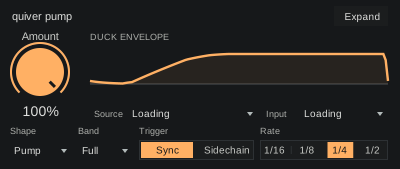
Sync the envelope to the beat, or let a kick track trigger the ducking through Sidechain.
Find the right shape.
Choose from eight envelopes and use Recovery to adjust how the sound comes back.
Keep the top end open.
Duck the full signal, or focus on the low end to make room where it matters.
Keep your attention on the track.
Drop pump into your device chain, choose a shape and fit the recovery to your kick. The groove stays in front of you.
Optimized for Push.
Make small changes without breaking your flow. A focused bank puts the controls you need directly under the eight encoders.
- 01
Shape the recovery
Reach for Amount and Recovery to get the kick and bass moving together.
- 02
Keep the rhythm close
Rate and Trigger stay on the encoders. The upper buttons stay clear.
- 03
Stay on the device
Switch Trigger to Sidechain to reveal Source and Input. Choose a numbered Source in Set order, then its Input tap.
Make it part of your setup.
Max for Live audio effect. One-time purchase.
The Max for Live bundle.
Pump, distort, shape, clipper and lean. Four focused effects and an expressive synth.
Already own a device? Complete your collection
A few useful details.
What do I need to run these?
You need Ableton Live Suite, or Live Standard with Max for Live. These devices don’t run in other DAWs.
Can I use pump on Push 3 standalone?
Pump’s controls are mapped to Push’s encoders. In Sidechain mode, Source and Input appear in the same bank; Sync leaves those two positions empty.
How do I install a Max for Live device?
Save the downloaded device in your User Library. Load effects on an audio track and lean on a MIDI track. See the installation instructions for Live and Push.
Are these part of Quiver Complete?
No. The M4L bundle contains pump, distort, shape, clipper and lean. Quiver Complete contains the native plugins. Each range has its own bundle and collection pricing.
Do bundles include future releases?
Your bundle includes the products listed when you buy it. Future releases are sold separately. When a new product joins your bundle, use Complete your collection to get bundle pricing on the products you don’t already own. You won’t need to buy the whole bundle again.
What does zero added latency mean?
Zero added latency means zero samples of processing delay. Your audio interface and Live’s buffer still contribute to monitoring latency.
Meet distort.
A little grit and movement to go with your groove.