
← All free tools 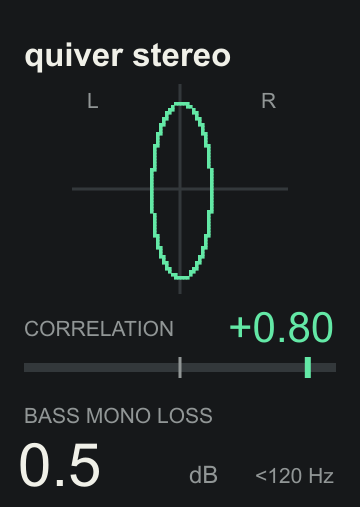
A small utility / A free download
stereo.
See your stereo field.
A small stereo field picture with correlation and bass mono loss underneath. See how your mix spreads out, and what changes when it meets mono.
VERSION 1.0.0 / MAX FOR LIVE AUDIO EFFECT
No sign-up. No activation. Max for Live required.
QUIVER / MAX FOR LIVEFREE
quiver stereo
120 PX WIDE / JUST THE READINGS YOU NEED
FreeNo activation
120 pxCompact device
Field + monoStereo compatibility
StereoAudio passes through unchanged
Three views / One small device
Make stereo easier to read.
Use the picture and readings together, then listen in mono before deciding what to change.
- Stereo field
- A vertical shape points toward mono. A wider shape shows more difference between the channels. A horizontal shape means opposite polarity. The picture scales to fit, so its size does not show loudness.
- Correlation
- +1 means matching channels; 0 means little shared movement; −1 means opposite polarity. Sustained negative readings invite a mono check. A brief dip is not automatically a problem.
- Bass mono loss
- Estimates the level lost below 120 Hz when summed to mono. 0 dB means preserved. About 3 dB is normal for uncorrelated stereo or a hard-panned signal. Larger losses can deserve a closer listen.
Download / Drop in / Play
Where you want a clearer view.
- Download and unzip the package.
- Drag quiver stereo.amxd onto an audio track or your Main/Master, after the processing you want to measure.
- Play your mix. Use Utility after the meter to compare mono while keeping the stereo analysis visible.
Audio passes through unchanged, with no added audio delay. Correlation and bass readings average 300 ms. Silence and undefined correlation show a dash.
The meter measures the signal at its position in the chain. It cannot identify cancellation between instruments already mixed together, or tell you whether a wide sound is right for your music.