
← All free tools 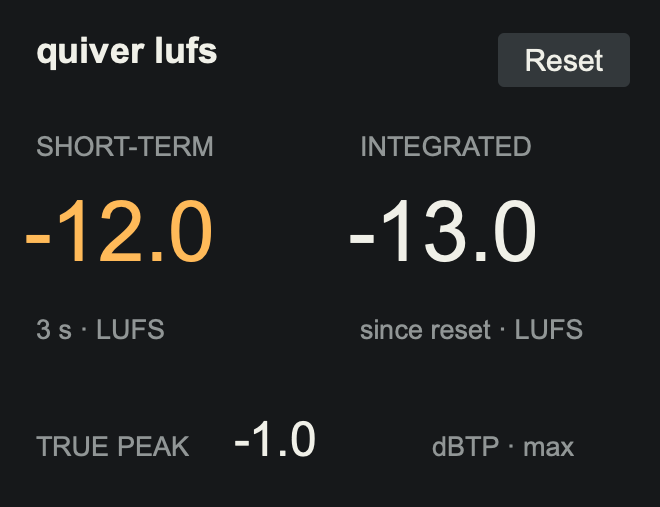
A small utility / A free download
lufs.
Know where your master lands.
Short-term and integrated loudness, plus maximum true peak, in one compact Max for Live device. Put it after your limiter and keep your levels in view.
VERSION 1.0.0 / MAX FOR LIVE AUDIO EFFECT
No sign-up. No activation. Max for Live required.
QUIVER / MAX FOR LIVEFREE
quiver lufs
220 PX WIDE / JUST THE READINGS YOU NEED
FreeNo activation
220 pxCompact device
LUFS + dBTPLoudness and true peak
StereoAudio passes through unchanged
Three readings / One clear view
Keep your ears on the music.
The readings stay in your device chain while you work. Reset when you want to measure a fresh pass.
- Short-term LUFS
- Loudness over the last three seconds. A useful view of the section you’re hearing right now.
- Integrated LUFS
- The gated average since loading the device or pressing Reset. Play the whole track to measure the whole master.
- Maximum true peak
- The highest true peak since Reset, in dBTP. Keep an eye on the peaks alongside your loudness.
Download / Drop in / Play
At the end of your master chain.
- Download and unzip the package.
- Drag quiver lufs.amxd into the last slot on your Main/Master track, after your limiter.
- Keep the Main/Master fader at 0 dB when checking the final output. Press Reset before a new measurement pass.
Reset clears integrated loudness and maximum true peak. Short-term keeps its rolling three-second window. Stopping or looping playback does not reset the integrated reading.