
← All free tools 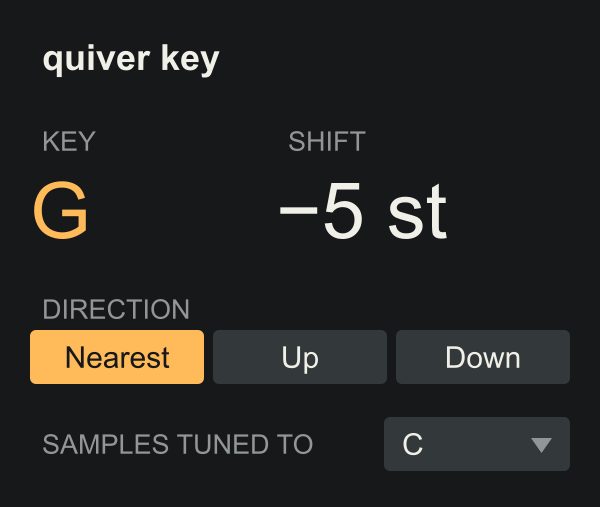
A small utility / A free download
key.
One pad. Always in key.
Put it in front of 808s, bass hits or one-shots tuned to one note. Every note you play moves by the root of Live’s current key. Change the key and the next hit follows.
VERSION 1.0.0 / MAX FOR LIVE MIDI EFFECT
No sign-up. No activation. Max for Live required.
QUIVER / MAX FOR LIVEFREE
quiver key
200 PX WIDE / TWO SETTINGS
FreeNo activation
200 pxCompact device
MIDI effectGoes in front of your instrument
12 keysFollows Live’s root note
Two readouts / Two settings
Set the key once.
Live already knows the key of your track. quiver key reads it and moves your notes, so a sample tuned to C plays the root of whatever key you’re in.
- Key and Shift
- Key shows the root of Live’s current key. Shift shows how many semitones are added to every note.
- Direction
- Nearest takes the shortest way, from 5 semitones down to 6 up. Up always goes up. Down always goes down. Try Up if your subs get too low.
- Samples tuned to
- The note your samples play at. Most packs are tuned to C. Change it for a pack tuned to F or A.
Download / Drop in / Play
In front of your sampler.
- Download and unzip the package.
- Drag quiver key.amxd onto a MIDI track, in front of the instrument. In a Drum Rack, put it inside the pad’s chain, in front of the sampler.
- Set the key in Live’s control bar and play a note.
Changing the key releases any held notes, so nothing is left sounding. quiver key follows the root note, not the scale type. Live shows the key of the clip you selected last, and that is the key the device follows.